
Introduction & Best Practice
Whenever we release updates to the platform, you’ll find a brief summary in this article. The table of contents highlights the most recent updates.
Table of contents
- Sep26 - Releases
- Aug26 - Releases
- Jul26 - Releases
- Jun26 - Releases
- Apr26 - Releases
-
Feb26 - Main Item columns included in the export of the Style Custom Report
Sep26 - Releases
New price notifications
As a brand user, you can now notify your suppliers or colleagues when updating the Brand Target Price in your style calculations.
As a supplier user, you can now notify the brand contact whenever updating the Supplier Cost Price.
Making price negotiation much easier.
Aug26 - Releases
PPWR - DoC generator
We have launched a new version of the DoC generator that allow users to create declarations of confirmity including Item data, used for the PPWR.
If you are not yet familiar with the PPWR regulation, you can read more here.
Find the step-by-step guide for the new DoC generator here.
The Style Tile view
Now you can get visual style overviews in Delogue 2.0 by switching to the tile view. Customise the style cards to show the needed data and continue to make bulk edits directly from this view.
Learn all about the feature here.
Jul26 - Releases
Inline edit in Table view
Users can edit/update single rows of Styles and Items directly from the table view - no need to open individual records. Clicking any editable field activates it instantly, making it easy to do style specific data entry.
Bulk Edit custom field specific to Brands, Groups or Categories
Include your Brand, Group or Category specific custom fields in your bulk edits.
It is only possible to edit the field if all selected styles matches the limitation of the custom fields.
Certificate Management in Supply Chain Mappings
Let you suppliers upload any certificates directly within the Supply Chain Mapping request. Both you and your supplier will be alerted if any certificates are expiring.
Compliance auditors will receive a structured export covering the full verified supply chain.
New user roles available
We have created new user roles that allow Company Users to have specific admin roles to support their daily work.
- Text Template - allow Company Users to create/edit or delete text templates in the Admin section.
- Custom Field Editor - allow Company Users to add new values to existing Custom Fields in the type 'Allowed value' and 'Hierarchy value'.
- Care Instruction Admin - allow Company Users to create/edit the Care Instruction section in Admin including Care Icons, materials etc.
- Import/Export - is now possible to combine directly with the Company User role, allowed Company Users access to any integration setup without access to the entire Admin section. Useful for any IT-responsible user.
Jun26 - Releases
Remove values in bulk
Now it is possible to not only add values to your styles and items in bulk, but also to remove values when needed.
Remove the values via the bulk edit function in the style view or item view in Delogue 2.0
Certificate management
Supplier users can now manage certificates at facility level, with built-in validity tracking and email alerts before certificates expire.
As a brand user, you can view all certificates held across a direct supplier's facilities in one consolidated tab.
May26 - Releases
New API for Style, Seasons and Items
New API's are ready for Style data, Season updates and Items are now available.
For the style data, it is now possible to update single/multiple styles and get colors for a specific style item.
It is also possible to bulk update any seasons in Admin.
Lastly, it is possible to get the item data such as: sizes, colors and details.
Find the Technical Documentation here.
Drag and drop favorite style filters
Tired of newly created style filters showing last in your saved style filters?
Now you can rearrange your favorite styles filters in the order you decide. Simply drag and drop any filters in the order that works best for you.
Update Style prices per size and color via Excel import
The new Import Template, allow you to update your update style prices per size and color via Excel, making it easier to work with SKU related prices among multiple styles within a collection.
Read more about the Excel import options here.
New API for Style and Care Instructions
New API's are ready for Style data and Care Instruction data.
For the style data, it is now possible to query individual style data from the API, with extensive filtering options.
For the Care Instruction data, you can now get the data directly from the Admin section, including the Icons, layers, materials and instructions, and also query single style care instructions.
Find the Technical Documentation here.
Apr26 - Releases
Table views and bulk edits
Style and Item table views are available in Delogue 2.0. These tables allow flexible filtrations on both styles and items, and gives you the possibility to update your master data and custom fields in bulk.
Update field values across multiple styles or items in one action — no need to open each record individually. Save time, stay consistent, and keep every change fully traceable in the audit log.
Read more here.
Supply Chain mapping request
The Supply Chain mapping request feature, allows brands to formally request detailed supply chain data from their suppliers for specific styles or items.
Instead of relying on manual spreadsheets, brands can trigger a request within the platform to see exactly where products are being manufactured, which sub-suppliers are involved, and which specific facilities are being used. Read more here
Hiding inactive item colors
It is now possible to hide/show your inactive item colors within the Item Details subtab, making it easier to focus on the colors that you are still actively working on.
Mar26 - Releases
The Supplier Portal
The supplier portal allow the suppliers to connect to all their customer's platforms within one unified supplier account. This is the first step in terms of our supplier module in preperation to the supply chain mapping requests.
Work smart together with your suppliers and prepare your data for the upcoming DPP requirements.
Email notifications showing CC recipients
Now it is possible to see who else is notified on messages sent in Delogue, directly in the email notifications. This allow clear transparency and efficient workflows.
New logic for unique item creations
Previously, the logic for unique items was build on a combination of:
- Item Name
- Brand
- Supplier
Now, we have updated the logic, to the combination of:
- Item Name
- Item Number
- Brand
- Supplier
This change allow you to create multiple items with the same name, as long as the item number are different.
Feb26 - Main Item columns included in the export of the Style Custom Report
It is now possible to include the main item columns in the export of any level of the Style Custom Report. Previously, it was only possible to include the main item columns when exporting on Style level - but now it is possible to include the columns in all 3 levels:
- STYLE
- STYLE/COLOR
- STYLE/COLOR/SIZE
The main item columns are:
- Main Item name
- Main Item number
- Main Item composition
- Main Item supplier
Jan26 - Sample Request Receive date logic improved
We have improved the logic of the 'received date' field of a sample request.
If the sample request is opened after it has been in the 'commented' status, and the user changes the status to 'recieved' - the received date will remain as the original receiving date.
The user can still update the date manually, if required.
Dec25 - Releases
Removal of default deadline in Style Sample Report
When creating new reports in the Style Sample Report tab, you will no longer see the default deadline of -30 days and +100 days. From now on, you can simply select the filter that fits your needs e.g. filtering on specific seasons.
The deadline option still exist, but it is now optional to use.
Direct link from Style Sample Report to the sample comments
When working with your sample requests in the Style Sample Report, you can now use the sample link in the sample type column, to go directly to the related sample comment.
Following the link, the sample comment pop-up window will automatically open according to the rules of sample states, and allows you to quickly update your samples.
Nov25 - Enhanced user roles for Compliance users
Compliance users are now able to use Declaration of Conformity templates when working on certificates in the Compliance module. With this feature you will be able to connect the DoC templates to the styles of the certificate that you are working on.
Oct25 - Style name and number generator
Style names and numbers are essential for keeping your work consistent and organised. That is why we have introduced a new version of the style name and number generator in Delogue - a feature that automatically creates names and numbers based on the rules you set up in Admin. With this update, you will be able to use the functionalities from the generator with improved performance, as well as new functionalities:
Style number generator
- Manual number overrides after style has been created
- Style number assignments only once a style is saved - preventing any duplicate assignments
To read more about the generator, please find more information in the 'Admin Setup' article and the 'Used on Styles' article.
Aug25 - Releases
Delogue 2.0
With this release, Delogue is gradually rolling out Delogue 2.0, featuring a refreshed user interface and a range of exciting new features.
The first redesigned area is the Dashboard, which will now be known as the Taskboard.
Learn more about Delogue 2.0 and how to switch between Delogue Classic and Delogue 2.0 here.
Taskboard
The Taskboard is an enhanced version of the Dashboard from Delogue Classic. It provides a comprehensive overview of your company tasks. To learn more, click here.
Print/export the grading chart
We have introduced a new option in the Style print and Excel export pop-ups that allows any Company User or Supplier User to choose whether to include the grading chart of a style. By default, only the Size Chart will be printed or exported. Users can check the new 'Include Grading chart' option if they wish to include both. Read more about the functionality in the article 'Create a size chart' here.
July25 - Item colour log changes
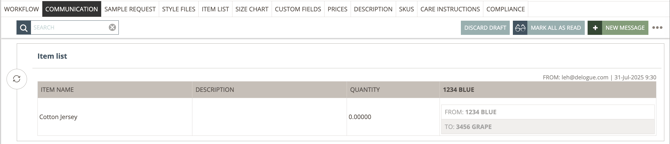
To improve transparency and tracking, we have introduced a new log feature for item colour changes in the style item list. When the colour of a style list item is changed, the style log under the Communication subtab now displays both the previous colour ('From') and the new colour ('To'). This provides a clear overview of all item colour updates.
June25 - Releases
Reports Sent Via Email
To provide a faster, more reliable experience with fewer errors on the Delogue platform, report exports will now be delivered directly to your email instead of downloading through your browser. This change will take effect starting Monday, June 9th.
Showing Quality Topics On Style Level
To improve usability, Quality Topics are now visible under the Compliance tab when viewing a style in Delogue. This ensures all relevant quality information is accessible while working with styles - similar to how reports and certificates are currently displayed.
Style print/export
Option to print or export without communication files
We have introduced a new option in the Style print and Excel export pop-ups that allows users to choose whether to include Communication files. By default, only Style Files will be printed or exported, helping reduce paper waste and avoid confusion for suppliers. Users can check the new 'Include Communication Files' option if they wish to include both.
Colour variant visible in PDF print and Excel export
With this release, colour variants of a style will now be visible in both the standard Style PDF print and Excel export. This ensures users no longer need to rely on the separate colourway print to access this important information. The update integrates seamlessly without changing the existing layout or design of the Style PDF print or Excel export.
May25 - Size Range Change Warning
In case a Style has been set to "Ready for Export", the system shows a yellow corner warning if the user changes the Size Range on the subtab "Size Chart".
The warning "Warning - style is set to 'Ready to export'. Changing the Size Range may cause issues" appears before the user clicks on save.
Jan25 - Expanded Size Chart Functionalities
The newly added size chart functionalities are designed to make your workflow smoother and more efficient. From the expanded view for easier data management to the zoom and scroll options for better navigation, and enhanced file handling that keeps your documents accessible, these features are built to save you time and simplify your processes.
Find more information about the extended size chart functionalities here.