
Introduction & best practice
When your supplier starts working in the Supplier Module, they convert their profile into a Supplier Portal Account. This means they will operate through a single log-in, allowing them to collaborate with multiple brands at the same time.
The Supplier Module is designed to promote transparency and ensure accurate data. Therefore, when the supplier completes the conversion, their company name and user names will be registered exactly as entered during the setup process.
Table of contents
- Before you start
- Why does the supplier name change?
- Which properties can be affected?
- Video explanation
- FAQ
Before you start
If you are responsible for the account merger process, meaning you are the one requesting the supplier to create the Supplier Portal Account, please inform your brand’s Delogue users in advance that the supplier company name and user names may change when the Supplier Portal Account is created and converted.
This helps avoid any internal confusion and ensures a smooth transition during the merger process.
Why does the supplier name change?
When converting to a Supplier Portal Account, the supplier provides their official company name and user information themselves. The details they enter during setup become the fixed, official name of the supplier going forward.
This name will also be reflected in the legacy platform, when the brand have used the supplier code for the conversion. As a result, the company name and user names you previously saw in your system may change once the account merger has been completed. The updated supplier name will appear not only in the Admin section (where all suppliers are listed), but also across items, styles, reports, and any other areas where the supplier is associated.
While this may cause temporary internal confusion, it is an important step toward ensuring accurate data collection and greater transparency. Having the supplier’s official company name and consistent user information strengthens data quality, and this standardization happens automatically as part of the conversion process.
Which information might be affected?
When a supplier converts to a Supplier Portal Account, they are required to complete supplier-specific information. This includes fields such as company name, address, VAT number, and supplier users.
Please refer to the picture and list below for a full overview of the data fields affected by the conversion.
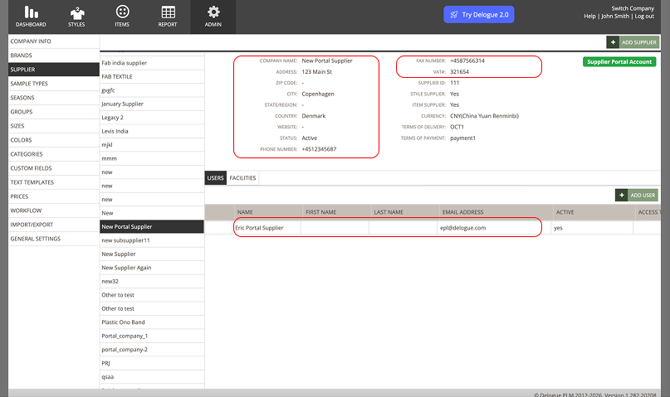
-
Company name
-
Address
-
Phone number
-
Website
-
VAT#
- Users
The data fields listed under Supplier ID remain brand-specific. These fields are not managed by the supplier and will continue to be maintained by the brand.
Video explanation
This video provides a visual overview and explanation of what happens to the supplier information when a supplier converts to a Supplier Portal Account.
FAQ
Q: Am I able to change the supplier name back after the merge?
A: No, this is not possible. The account merge cannot be reversed, meaning the supplier’s new company name and user names will remain fixed after the merge. This ensures correct and consistent data, which also benefits your reporting and data accuracy.
Q: Does the supplier have the possibility to change any of their information?
A: Yes. If the supplier makes a spelling mistake during the setup or merge process, they are able to correct their information in the legacy platform.
Q: If the supplier has already completed the merge with another brand, do they have to fill in the information again when my brand merges the profile?
A: No. The information provided by the supplier during the first merge becomes their fixed supplier information. Therefore, when another brand merges with the same supplier, the same supplier details will automatically apply.
Q: If the supplier has already completed the merge with another brand, will their info change in my brand platform?
A: This is fully dependent on whether you complete the conversion yourself, nothing will change in your platform unless you actively carry out the conversion with the code given by your supplier.